 ShenZhen Washxing Technology Co.,Ltd


¿Cómo determinar el centro de rotación de rotación al operar una máquina CNC de 4 ejes?
Here, we show a 4-axis rotary table that rotates around the X-axis of a machine tool, where the axis of rotation is called the A-axis. In a word, all we need to do is to determine the Y/Z coordinates of the center of rotation on the 4-axis machine.
In addition, the X coordinate values are determined by the placement of the product, so we won’t go into detail here. The following are the specific steps to determine the center of rotation.
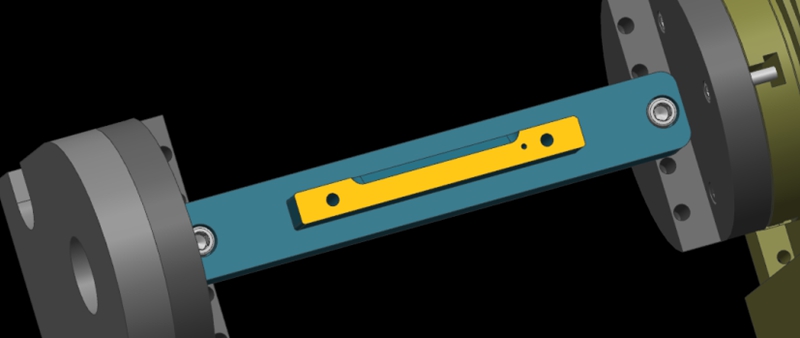
Step 1: Calibrate the Fixture Reference Plane
Firstly, use the calibration table to calibrate the fixture datum plane (the yellow surface). Then, set the calibrated datum plane to the 0 degree position of the A-axis.
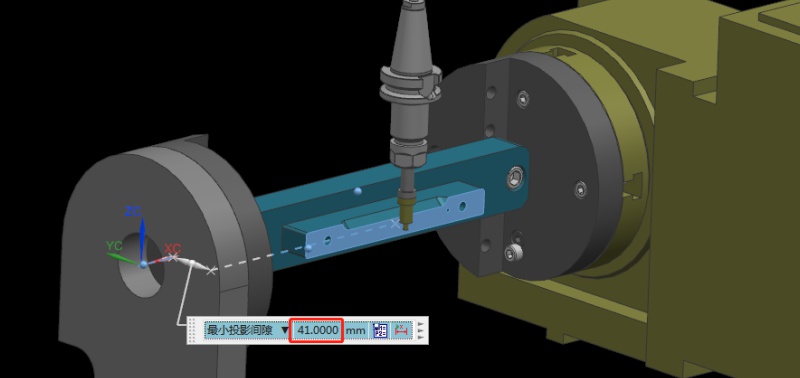
Step 2: Set the Fixture Datum Plane
After setting the datum plane, we need to rotate the A-axis 90 degrees positive. Then, use a centering bar to measure the machine position where the datum plane is located. In the relative coordinate setting, set the Y coordinate to “0”.
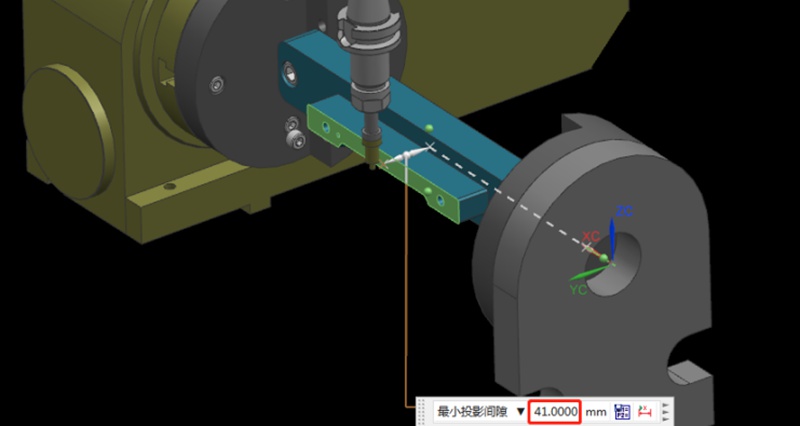
Step 3: Measure the Value of the Datum Plane
Next, rotate the A-axis 180 degrees in the negative direction. Same as the last step, we need to measure the machine position on the other side of the datum using the centering bar. Then, check the current relative Y value of the machine. For example, if we assume the Y value is “92mm”, the centering diameter is 10mm centering diameter, and the fixture datum to the rotary table is 41mm.
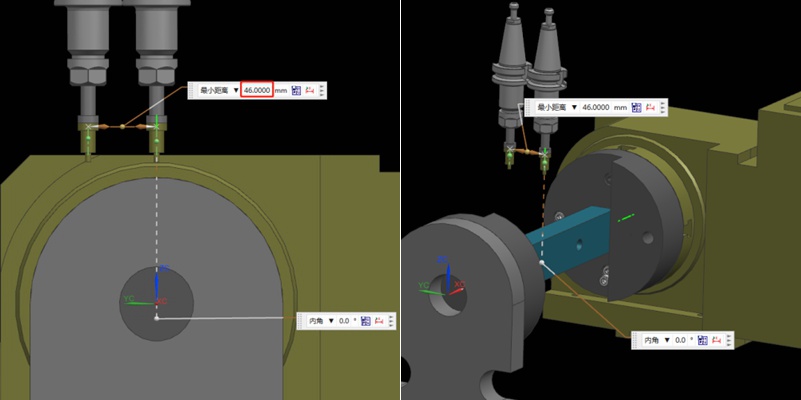
Step 4: Determine the Position of the Rotation Center in the Y-axis
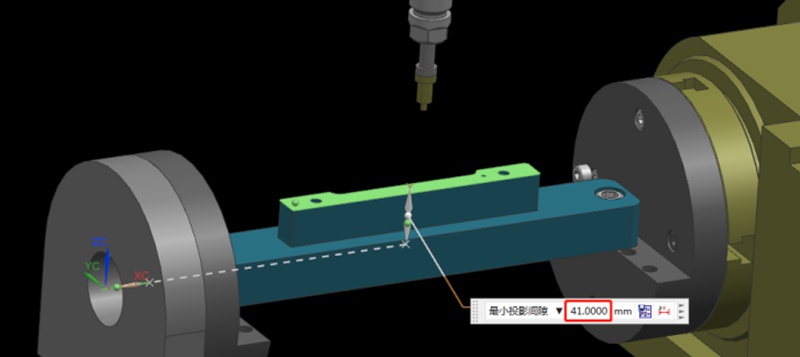
Referring to the values in the previous step, we can calculate that 92/2 = 46mm, so half of the Y value of 46mm. Then, we move the centering bar 46mm negatively towards the Y-axis.
As shown by the picture, the centering bar is now just aligned with the rotational axis of the rotary table. At the time, the position of the alignment point is the zero point of the Y value of the machine. In this way, we have completed half of the operation work.
Step 5: Find the Position of the Rotation Center in the Z-axis
Finding the Z value is relatively simple. After the rotary table returns to the A0 position, the zero point of the Z-axis of the rotary axis can be determined by moving down 41mm with the datum surface as the calculation base. This value is calculated using the formula “(92-10)/2”, where 92 is the Y-value found earlier and 10 is the diameter of the centering bar. By applying this formula, the Z value is determined.
Finally, the intersection of the Z and Y axis is the rotation center around the X axis. With these steps, we can determine the rotation center of the 4-axis rotary table.
Recomendaciones
¿Cómo evitar la colisión de máquinas en el proceso de mecanizado?
Machine collision has always been an inevitable challenge in prototype and part machining. Operator errors, such as failing to perform tool settings, can lead to crashes. It will result in broken tools, scrapped workpieces, and reordering and reprocessing materials. In addition, without the automatic tool setter, manual tool setting when entering Z-value data error can also cause machine collision. In this article, we will share our summarized experiences to help you avoid this issue. Bef...

Press Fit Tolerance: Defination, Practices, and Calculation
La industria manufacturera está muy centrada en la precisión, donde hasta el más mínimo margen puede crear enormes diferencias en la calidad, el coste y la utilidad del producto. Este artículo aborda el tema del ajuste a presión, en el que unos pocos micrómetros de desviación dictan el criterio para el fallo de una pieza. Así pues, qué es el ajuste a presión y los factores que influyen en el tolerado del ajuste a presión, y presentamos un ejemplo de calculadora de ajuste a presión. También compartiremos algunos consejos clave a tener en cuenta al diseñar componentes para p...
Producción y fabricación de puentes: Etapas clave y ventajas
Adopting a final production process often involves numerous trials and failures, particularly during prototyping or low-volume production. Companies may temporarily select a production method until they are confident in their approach. Bridge production refers to this temporary strategy, enabling continued operations while a more reliable manufacturing process is developed. Understanding bridge production is crucial for enhancing product development and expediting operations. This article...

What Is SFM? A Complete Guide To Surface Feet Per Minute In Machining
SFM, meaning Surface Feet per Minute in CNC machining, measures how fast a cutting tool moves across a workpiece. It is expressed in feet per minute. SFM combines the tool or workpiece diameter with the spindle speed (RPM). A larger diameter or higher RPM results in a higher SFM. Machinists use surface feet per minute to determine the best cutting speed for a material. Different materials have recommended SFM values for optimal performance. For example, 303 annealed stainless steel has an...