 심천 워싱 기술 유한공사


4축 CNC 기계를 작동할 때 로터리의 회전 중심을 결정하는 방법은 무엇입니까?
Here, we show a 4-axis rotary table that rotates around the X-axis of a machine tool, where the axis of rotation is called the A-axis. In a word, all we need to do is to determine the Y/Z coordinates of the center of rotation on the 4-axis machine.
In addition, the X coordinate values are determined by the placement of the product, so we won’t go into detail here. The following are the specific steps to determine the center of rotation.
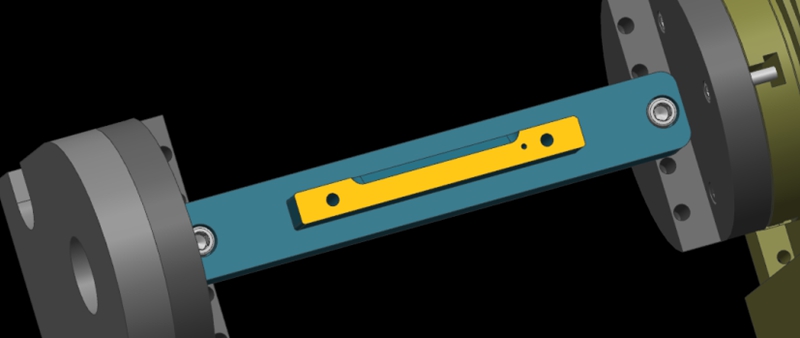
Step 1: Calibrate the Fixture Reference Plane
Firstly, use the calibration table to calibrate the fixture datum plane (the yellow surface). Then, set the calibrated datum plane to the 0 degree position of the A-axis.
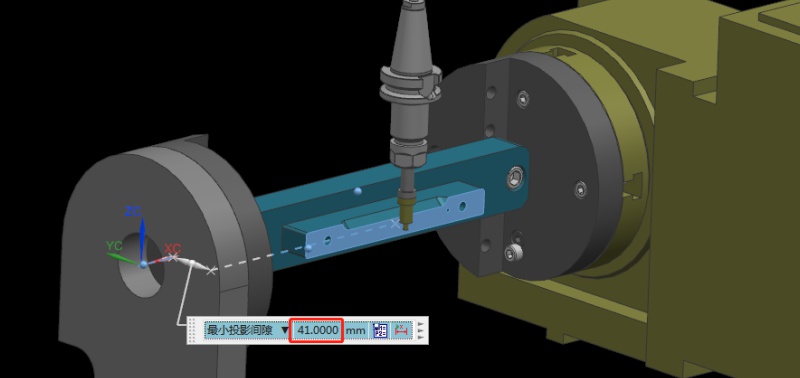
Step 2: Set the Fixture Datum Plane
After setting the datum plane, we need to rotate the A-axis 90 degrees positive. Then, use a centering bar to measure the machine position where the datum plane is located. In the relative coordinate setting, set the Y coordinate to “0”.
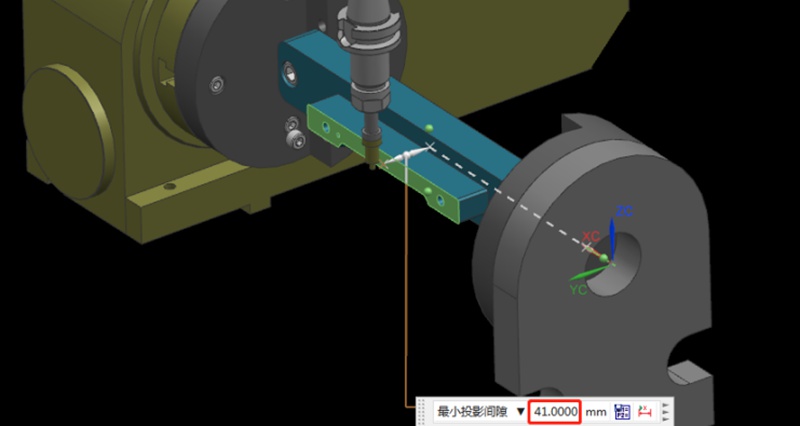
Step 3: Measure the Value of the Datum Plane
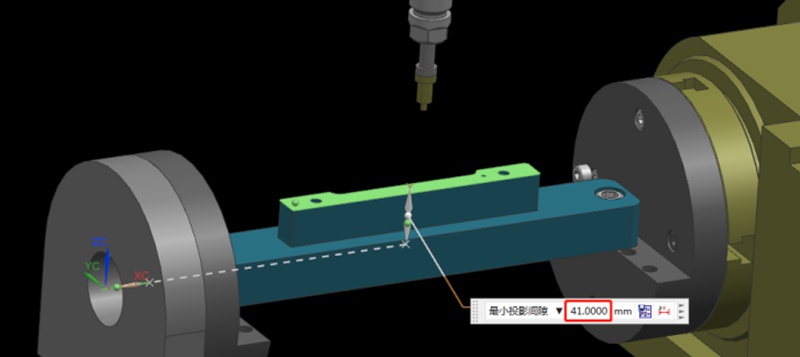
Next, rotate the A-axis 180 degrees in the negative direction. Same as the last step, we need to measure the machine position on the other side of the datum using the centering bar. Then, check the current relative Y value of the machine. For example, if we assume the Y value is “92mm”, the centering diameter is 10mm centering diameter, and the fixture datum to the rotary table is 41mm.
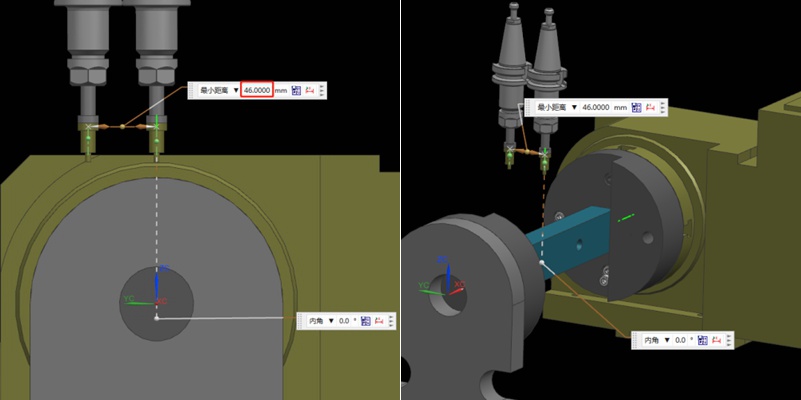
Step 4: Determine the Position of the Rotation Center in the Y-axis
Referring to the values in the previous step, we can calculate that 92/2 = 46mm, so half of the Y value of 46mm. Then, we move the centering bar 46mm negatively towards the Y-axis.
As shown by the picture, the centering bar is now just aligned with the rotational axis of the rotary table. At the time, the position of the alignment point is the zero point of the Y value of the machine. In this way, we have completed half of the operation work.
Step 5: Find the Position of the Rotation Center in the Z-axis
Finding the Z value is relatively simple. After the rotary table returns to the A0 position, the zero point of the Z-axis of the rotary axis can be determined by moving down 41mm with the datum surface as the calculation base. This value is calculated using the formula “(92-10)/2”, where 92 is the Y-value found earlier and 10 is the diameter of the centering bar. By applying this formula, the Z value is determined.
Finally, the intersection of the Z and Y axis is the rotation center around the X axis. With these steps, we can determine the rotation center of the 4-axis rotary table.
권장 사항
공정 경로와 픽스처를 설계하여 다면체 알루미늄 부품을 가공하는 방법은 무엇입니까?
가공 및 제조 분야에서는 생산 효율성을 개선하기 위해 적절한 가공 전략을 선택하는 것이 중요합니다. 일반적으로 다면체 가공 부품은 형상이 복잡하고 공차 요구 사항이 엄격합니다. 따라서 이러한 부품 가공에 적합한 가공 경로를 선택하려면 종합적인 고려가 필요합니다. 이 기사에서 워싱은 다면체 알루미늄 부품의 다양한 공정 경로에 대한 분석을 제공하고 3+2 축 CNC 가공과 ...
가공 공정에서 기계 충돌을 피하는 방법은?
기계 충돌은 프로토타입 및 부품 가공에서 항상 피할 수 없는 과제였습니다. 공구 설정 실패와 같은 작업자 오류는 충돌로 이어질 수 있습니다. 이는 공구 파손, 공작물 폐기, 재료 재주문 및 재가공으로 이어질 수 있습니다. 또한 자동 공구 세터가 없는 경우 Z값 데이터 오류 입력 시 수동 공구 설정도 기계 충돌을 일으킬 수 있습니다. 이 기사에서는 이러한 문제를 방지하는 데 도움이 되는 요약된 경험을 공유합니다. Bef...

SFM이란? 가공 시 분당 표면 피트에 대한 완벽한 가이드
SFM, meaning Surface Feet per Minute in CNC machining, measures how fast a cutting tool moves across a workpiece. It is expressed in feet per minute. SFM combines the tool or workpiece diameter with the spindle speed (RPM). A larger diameter or higher RPM results in a higher SFM. Machinists use surface feet per minute to determine the best cutting speed for a material. Different materials have recommended SFM values for optimal performance. For example, 303 annealed stainless steel has an...

브리지 생산 및 제조: 주요 단계 및 이점
최종 생산 공정을 채택하려면 특히 프로토타입 제작이나 소량 생산 과정에서 수많은 시행착오와 실패가 수반되는 경우가 많습니다. 기업은 접근 방식에 확신을 가질 때까지 일시적으로 생산 방법을 선택할 수 있습니다. 브리지 생산은 이러한 임시적인 전략을 말하며, 보다 안정적인 제조 프로세스를 개발하는 동안 지속적인 운영을 가능하게 합니다. 브리지 생산을 이해하는 것은 제품 개발을 개선하고 운영을 가속화하기 위해 매우 중요합니다. 이 문서...