 심천 워싱 기술 유한공사


4축 CNC 기계를 작동할 때 로터리의 회전 중심을 결정하는 방법은 무엇입니까?
Here, we show a 4-axis rotary table that rotates around the X-axis of a machine tool, where the axis of rotation is called the A-axis. In a word, all we need to do is to determine the Y/Z coordinates of the center of rotation on the 4-axis machine.
In addition, the X coordinate values are determined by the placement of the product, so we won’t go into detail here. The following are the specific steps to determine the center of rotation.
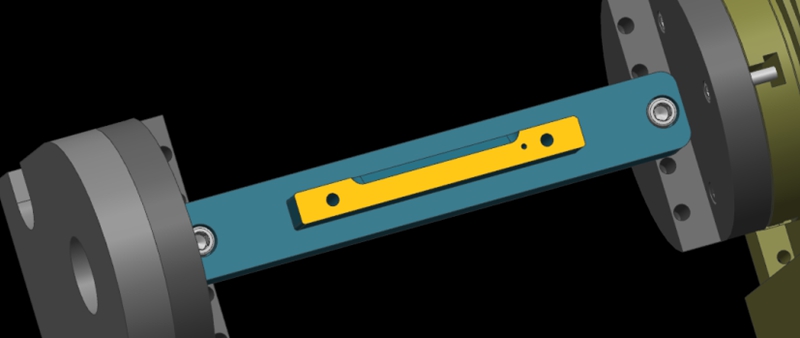
Step 1: Calibrate the Fixture Reference Plane
Firstly, use the calibration table to calibrate the fixture datum plane (the yellow surface). Then, set the calibrated datum plane to the 0 degree position of the A-axis.
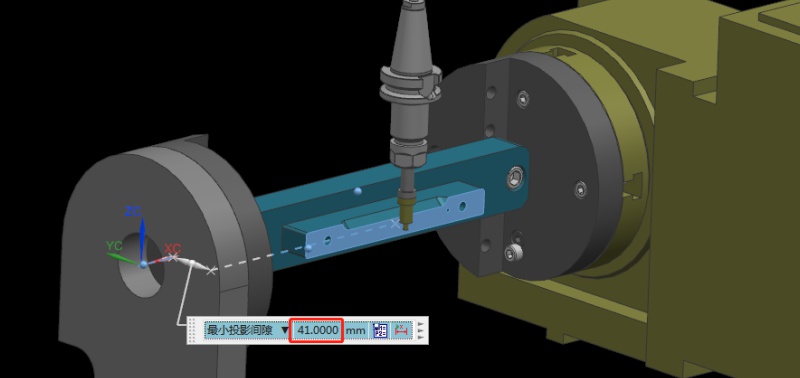
Step 2: Set the Fixture Datum Plane
After setting the datum plane, we need to rotate the A-axis 90 degrees positive. Then, use a centering bar to measure the machine position where the datum plane is located. In the relative coordinate setting, set the Y coordinate to “0”.
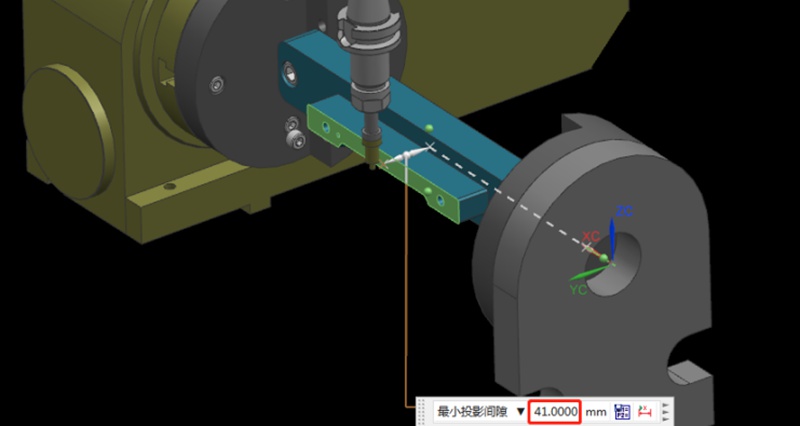
Step 3: Measure the Value of the Datum Plane
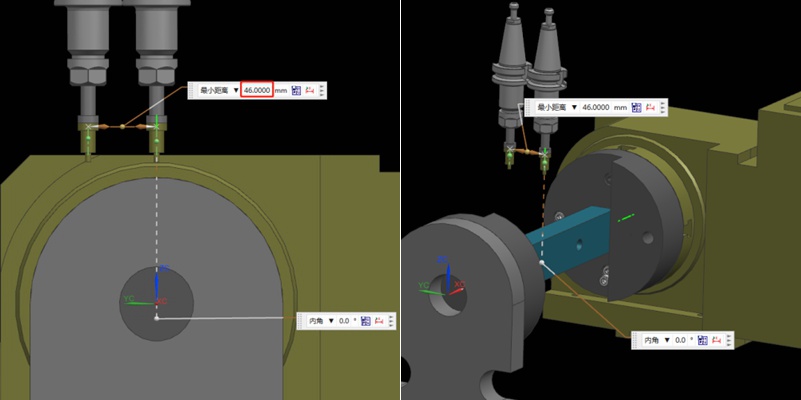
Next, rotate the A-axis 180 degrees in the negative direction. Same as the last step, we need to measure the machine position on the other side of the datum using the centering bar. Then, check the current relative Y value of the machine. For example, if we assume the Y value is “92mm”, the centering diameter is 10mm centering diameter, and the fixture datum to the rotary table is 41mm.
Step 4: Determine the Position of the Rotation Center in the Y-axis
Referring to the values in the previous step, we can calculate that 92/2 = 46mm, so half of the Y value of 46mm. Then, we move the centering bar 46mm negatively towards the Y-axis.
As shown by the picture, the centering bar is now just aligned with the rotational axis of the rotary table. At the time, the position of the alignment point is the zero point of the Y value of the machine. In this way, we have completed half of the operation work.
Step 5: Find the Position of the Rotation Center in the Z-axis
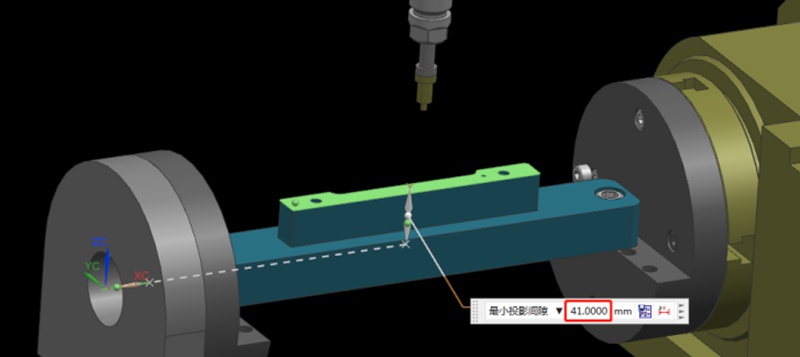
Finding the Z value is relatively simple. After the rotary table returns to the A0 position, the zero point of the Z-axis of the rotary axis can be determined by moving down 41mm with the datum surface as the calculation base. This value is calculated using the formula “(92-10)/2”, where 92 is the Y-value found earlier and 10 is the diameter of the centering bar. By applying this formula, the Z value is determined.
Finally, the intersection of the Z and Y axis is the rotation center around the X axis. With these steps, we can determine the rotation center of the 4-axis rotary table.
권장 사항
Cost Of CNC Machining: What Affects & How to Save It?
CNC machining is a technique used to make precision parts and replicate amazing designs. There are a lot of advantages of CNC machining, such as increasing the speed of parts production. It also reduces human errors during manufacturing as it is being controlled by the computer. However, many people do not seem to understand the rationale behind its cost. The machine and material you use can affect the price. Today, many customers still struggle with CNC machining cost calculation. With t...
Types Of Milling Explained: Know All Milling Operations
Milling is inarguably the backbone of the manufacturing industry, playing a direct role in high-quality production in industries including aerospace, automotive, medical, and defense. Milling operations are highly versatile and capable of handling complex geometries with precision and speed. In this article, we will discuss the fundamentals of CNC milling and explain various milling operations, helping to choose the right milling type for your applications.Milling is a machining process t...
Press Fit Tolerance: Defination, Practices, and Calculation
The manufacturing industry is highly precision-centric, where even the slightest of margins can create huge differences in product quality, cost, and utility. This article discusses the topic of press fitting, where a few micrometers of deviation dictates the criterion for part failure. So, what is press fit and, the factors influencing press fit tolerancing, and present an example of a press fit calculator. We will also share some key tips to keep in mind while designing components for p...
CNC 아크릴 가공: 가공된 아크릴 부품에 대해 알아야 할 모든 것
오늘은 아크릴 폴리머 또는 광학 프로토타이핑의 제조 공정에 대해 살펴보겠습니다. 아크릴은 전 세계적으로 가장 널리 사용되는 플라스틱 중 하나이며 유리와 폴리카보네이트의 유력한 경쟁자입니다. 아크릴 부품은 많은 산업 분야에서 사용되기 때문에 거의 모든 종류의 아크릴 생산에 존재하는 공정이기 때문에 제조 공정, 특히 CNC 아크릴 가공을 살펴보는 것이 좋습니다. 이 기사에서 우리는 ...